Voice typing Chrome extension: Loro for Chrome
In short
To type with your voice in Chrome, install the Loro for Chrome extension, click where you want to write, hold Alt + L (⌥ L on a Mac), speak and let go. The text appears where your cursor is, with periods, commas and capital letters, and without the "um"s and "you know"s. It works in Gmail, ChatGPT, WhatsApp Web and any text box. Sign in with your Google account and get 500 words to try it.
Chrome has no dictation for every page
On a computer, Chrome has no button to dictate into web pages. Google Docs has its own (Tools › Voice typing), but it only works inside Docs. In Gmail, ChatGPT or WhatsApp Web you're left with your system's dictation (Windows + H or the Mac's), which types word for word, filler words included.
A dictation extension fixes that: it lives in Chrome and types into whatever page you have open.
How to dictate in Chrome with Loro
- Add Loro to Chrome from the Chrome Web Store. It installs in one click.
- A three-step welcome opens: sign in with your Google account, allow the microphone and try dictating right there.
- Go to the page where you want to write and click in the text box.
- Hold Alt + L (on a Mac, ⌥ L) and speak.
- Let go. The text appears where your cursor was.
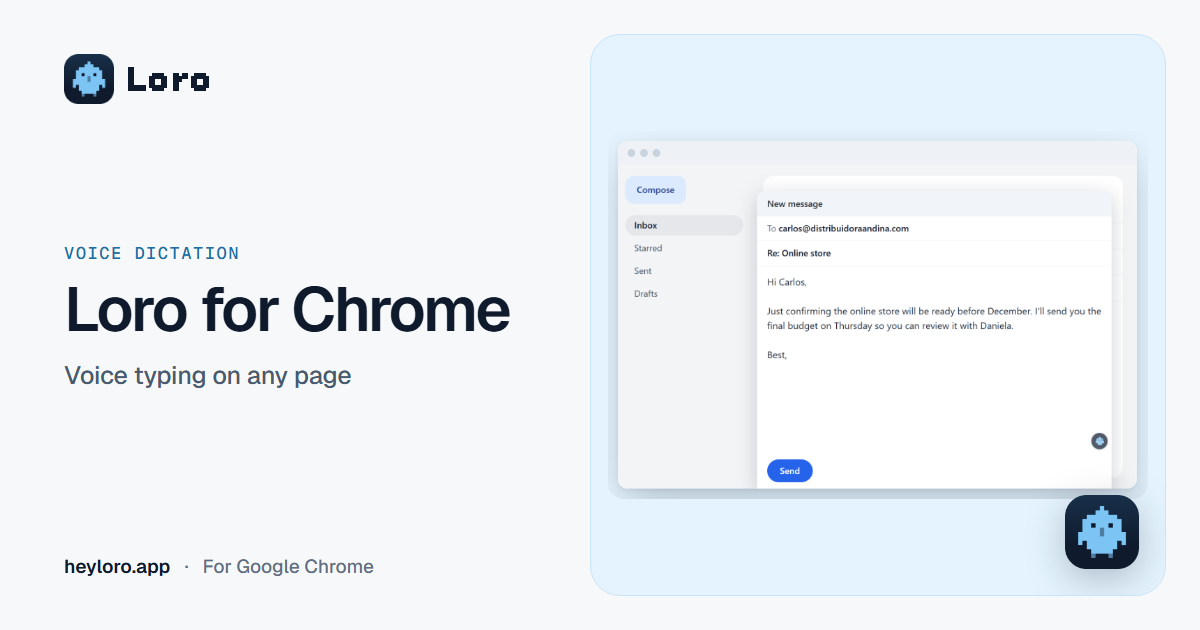
An example. In Gmail you say: "um, hi Carlos, just confirming that, you know, the online store will be ready before December, and I'll send you the quote on Thursday". Loro types: "Hi Carlos, just confirming that the online store will be ready before December. I'll send you the quote on Thursday."
Other ways to use it:
- Tap Alt + L once and Loro listens until you tap it again. Handy for dictating something long without holding the keys.
- Esc cancels the dictation.
- The parrot next to the text box: big text boxes get a small parrot button. One click does the same as the shortcut. If you don't want it, turn it off in Loro's popup (the parrot icon in Chrome's toolbar).
- Change the shortcut in that same popup, if Alt + L clashes with something you already use.
Add Loro to Chrome
Free to try: sign in with your Google account and get 500 words. Dictate on any page with Alt + L.
Where it works
On any page in Chrome where you can type:
- Gmail: your emails, split into paragraphs. More in how to dictate emails.
- ChatGPT, Claude and Gemini: ask the AI out loud. More in how to dictate to ChatGPT.
- WhatsApp Web and LinkedIn: natural messages, the way you'd write them.
- Forms, comments and notes: any text box.
Loro looks at which page you're on and adjusts the text: an email comes out polished and a chat, casual. It understands English and Spanish.
If a page doesn't let an extension type into it, Loro copies the text and tells you: paste it with Ctrl + V. We haven't tested Google Docs yet; there you can use Docs' own voice typing or the Loro app on your computer.
The extension or the Loro app
The extension is the quickest way to try Loro. The computer app does more:
| Loro for Chrome | Loro for Windows and Mac | |
|---|---|---|
| Where it dictates | On pages in Chrome | In all your apps: Word, WhatsApp, Slack, Chrome… |
| Shortcut | Alt + L (⌥ L on a Mac) | Ctrl + Win (fn on a Mac) |
| Meeting notes | No | Yes, without adding a bot to the call |
| How it installs | One click in the Chrome Web Store | An installer for Windows or Mac |
| Price | 500 words to try | 7 free days of Pro; then USD 9.99 a month |
The 500 trial words are shared between the extension and the app. When they run out, the extension takes you to download Loro.
Your voice and your data
- Loro doesn't keep your voice: it turns it into text and deletes it.
- To polish what you dictate, it uses the text already next to your cursor, only at that moment.
- Chrome asks for two permissions: the microphone, and reading and changing pages, because Loro has to be able to type into a text box on any page. It only acts on the box where you dictate, and only while you dictate.
It's all in the privacy policy.
Frequently asked questions
Is there a Chrome extension for voice typing?
Yes. Loro for Chrome turns your voice into text on any page: hold Alt + L, speak and let go. It understands English and Spanish, and types with punctuation.
Is it free?
You can try it for free: sign in with your Google account and get 500 words. To keep dictating, get Loro on your computer, which starts with 7 free days of Loro Pro.
Does Chrome have voice typing?
Not for every page. Google Docs has its own voice typing, in Tools › Voice typing. On other pages you can use Windows dictation (Windows + H), the Mac's dictation or an extension like Loro for Chrome.
Does it work in Gmail and ChatGPT?
Yes. Click in the email or chat box, hold Alt + L, speak and let go. The text appears where your cursor was.
Can I change the Alt + L shortcut?
Yes. Click the Loro icon in Chrome's toolbar and change the shortcut in the popup. Loro won't let you pick one that Chrome or your system already uses.
Does Loro keep what I dictate?
It doesn't keep your voice: it turns it into text and deletes it. To polish the text it uses what's next to your cursor, only at that moment.
What's the difference from the Loro app?
The extension only dictates on pages in Chrome. The Windows and Mac app dictates in all your apps and takes notes in your meetings without adding a bot.
Sources
- Loro for Chrome, in the Chrome Web Store.
- Loro, privacy policy, "The Chrome extension".
- Google, Type & edit with your voice, checked November 7, 2026.
Keep reading
 Voice dictation
Dictate emails in Gmail and Outlook
Gmail has no dictation button on the computer, and Outlook does, with Microsoft 365. How to dictate your emails in both, on Windows and Mac, and how to get clean text that's ready to send.
 Voice dictation
Dictate in ChatGPT
ChatGPT has a microphone for dictation and a voice mode for conversations. How to use each one on a computer, and how to dictate long prompts with clean text in ChatGPT, Claude, Gemini or any AI.
 Voice dictation
Voice typing on Windows
How to dictate with your voice on Windows 10 and 11 using Windows + H, how to add punctuation, what to do if it doesn't work, and when an app like Loro, which cleans up your text and works offline, is worth it.
Google Chrome, Gmail, ChatGPT, Claude, Gemini, WhatsApp, LinkedIn and Google Docs are trademarks of their owners. Loro is not affiliated with them. Each app's details come from its official pages, checked on November 7, 2026.